

Integrate Localytics with Optimizely Feature Experimentation
 David SertillangeIndependent experimentation specialist
TL;DR
Localytics (now part of Upland Software) is a mobile analytics and engagement platform used in iOS and Android apps. Integrating Localytics with Optimizely Feature Experimentation sends experiment decision data into Localytics as custom events and attributes, enabling you to segment analytics reports by experiment variation and build funnels that compare user behavior across treatment groups within your mobile app.
This guide covers two integration approaches — custom event attributes and custom dimensions — with implementation examples for Android (Java and Kotlin) and iOS (Swift and Objective-C).
How the Integration Works
When the Optimizely Feature Experimentation SDK evaluates a feature flag using the decide() method, it fires a DECISION notification. You register a listener for this notification that captures the flag key and variation, then passes the data to Localytics using either tagEvent() with attributes or setCustomDimension(). Localytics then associates the experiment context with user sessions and events.
sequenceDiagram
    participant App as Mobile App
    participant SDK as Optimizely SDK
    participant Listener as DECISION Listener
    participant LL as Localytics SDK
    participant Dash as Localytics Dashboard

    App->>SDK: createInstance(sdkKey)
    App->>SDK: addNotificationListener(DECISION, callback)
    App->>SDK: user.decide("flag_key")
    SDK->>Listener: DECISION notification fires
    Listener->>LL: tagEvent() with flag + variation attributes
    Listener->>LL: setCustomDimension() with variation
    App->>App: User interacts with the app
    LL->>Dash: Events + dimensions include experiment context
    Dash->>Dash: Segment funnels, retention, events by variation
Choosing Your Approach
Localytics offers two mechanisms for tagging data with experiment context. Pick the one that fits your analysis workflow — or use both for maximum flexibility.
Custom Event Attributes | Custom Dimensions | |
|---|---|---|
What it does | Attaches experiment data to specific events via | Sets session-level dimensions via |
Filtering | Filter events by attribute values in event-level reports | Filter all reports and dashboards by dimension |
Setup | Code-only — no dashboard configuration | Requires naming each dimension index in the Localytics dashboard |
Limit | No hard limit on attribute keys per event | 20 dimensions total (indices 0-19) shared across all uses |
Best for | Event-level analysis (funnels, event counts by variation) | Session-level segmentation (retention, DAU by variation) |
Recommendation: Use custom event attributes for event-level analysis and custom dimensions for session-level segmentation. For most teams, starting with custom event attributes is simpler since it requires no dashboard configuration.
Prerequisites
Optimizely Feature Experimentation SDK installed for your mobile platform:
Android:
com.optimizely.ab:android-sdk(v4+)iOS:
OptimizelySwiftSDK(v4+) via CocoaPods, SPM, or Carthage
Localytics SDK installed and initialized:
Android:
com.localytics.android:libraryvia GradleiOS:
Localyticsvia CocoaPods or manual installation
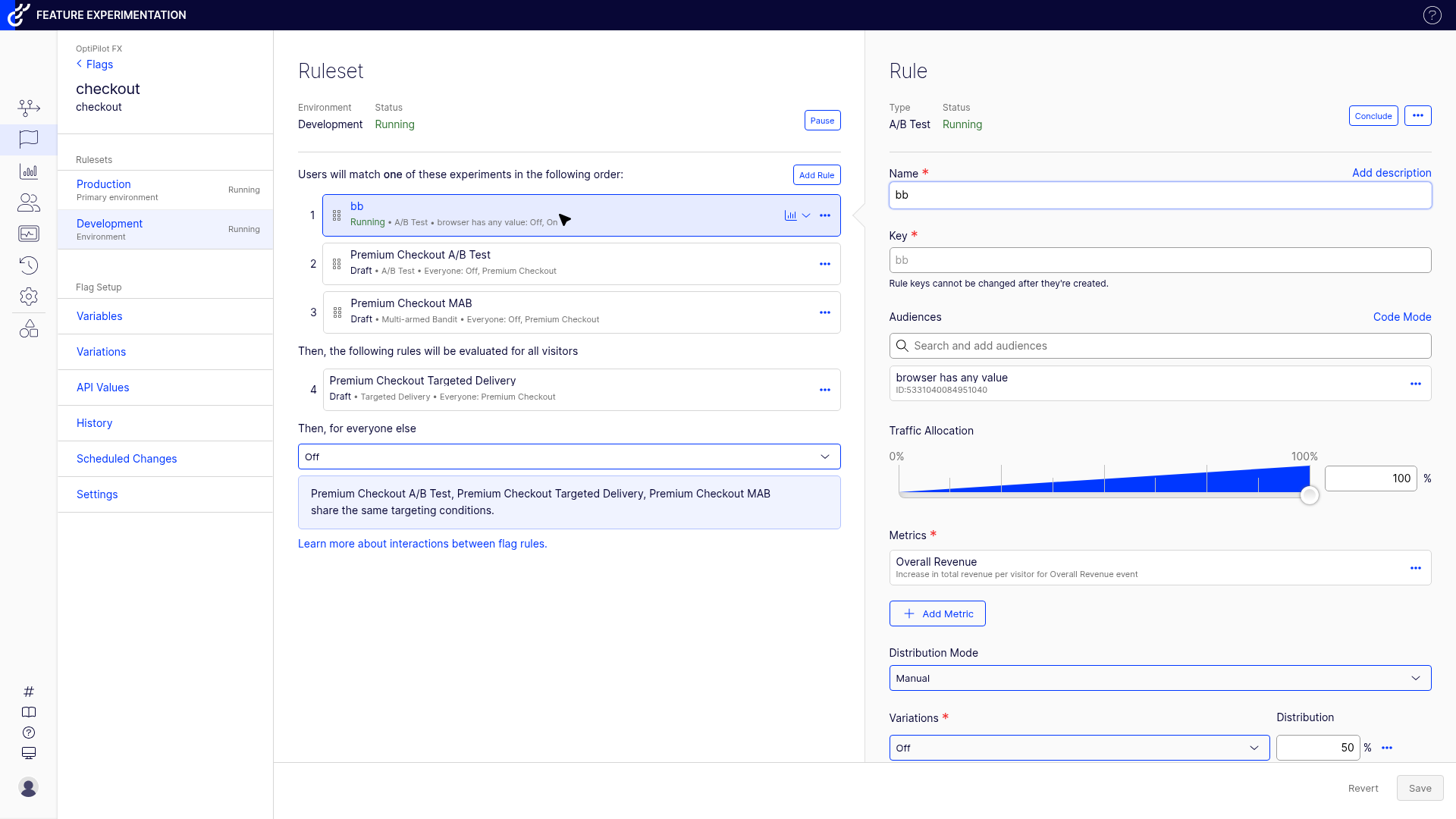
A feature flag with an experiment rule configured in your Optimizely project.
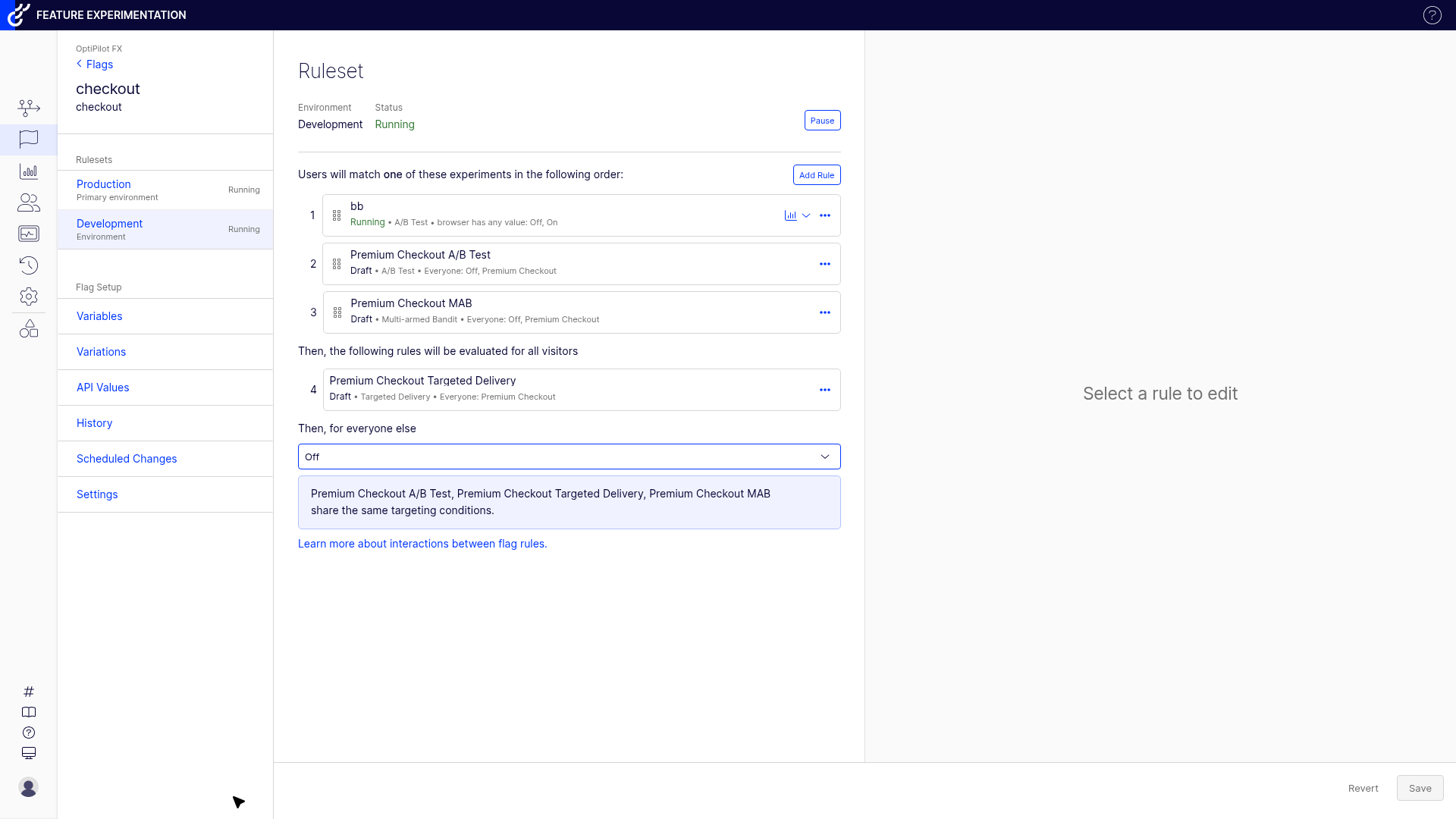
The experiment rule is what triggers the DECISION notification. Each rule has a type (A/B Test, Targeted Delivery), traffic allocation, and variations — the variationKey from the DECISION notification matches the variation keys shown here.
Consistent user ID between Optimizely and Localytics. Call
Localytics.setCustomerId(userId)with the same ID used forcreateUserContext().
Android Implementation
Java — Custom Event Attributes
import com.optimizely.ab.OptimizelyClient;
import com.optimizely.ab.notification.DecisionNotification;
import com.optimizely.ab.optimizelydecision.OptimizelyDecision;
import com.localytics.android.Localytics;

import java.util.HashMap;
import java.util.Map;

public class OptimizelyLocalyticsIntegration {

    private final OptimizelyClient optimizelyClient;

    public OptimizelyLocalyticsIntegration(OptimizelyClient client) {
        this.optimizelyClient = client;
        registerDecisionListener();
    }

    private void registerDecisionListener() {
        optimizelyClient.getNotificationCenter().addNotificationHandler(
            DecisionNotification.class,
            notification -> {
                String type = notification.getType();
                if (!"flag".equals(type)) return;

                Map<String, ?> decisionInfo = notification.getDecisionInfo();
                String flagKey = (String) decisionInfo.get("flagKey");
                Boolean enabled = (Boolean) decisionInfo.get("enabled");
                String variationKey = (String) decisionInfo.get("variationKey");
                String ruleKey = (String) decisionInfo.get("ruleKey");

                String variationValue = Boolean.TRUE.equals(enabled)
                    ? variationKey : "off";

                // Tag a custom event with experiment attributes
                Map<String, String> attributes = new HashMap<>();
                attributes.put("optimizely_flag", flagKey);
                attributes.put("optimizely_variation", variationValue);
                if (ruleKey != null && !ruleKey.isEmpty()) {
                    attributes.put("optimizely_rule", ruleKey);
                }
                Localytics.tagEvent("Experiment Decision", attributes);
            }
        );
    }

    public OptimizelyDecision evaluateFlag(String userId, String flagKey) {
        // Ensure consistent user identity
        Localytics.setCustomerId(userId);

        var user = optimizelyClient.createUserContext(userId);
        return user.decide(flagKey);
    }
}
Kotlin — Custom Event Attributes
import com.optimizely.ab.OptimizelyClient
import com.optimizely.ab.notification.DecisionNotification
import com.localytics.android.Localytics

class OptimizelyLocalyticsIntegration(
    private val optimizelyClient: OptimizelyClient
) {
    init {
        registerDecisionListener()
    }

    private fun registerDecisionListener() {
        optimizelyClient.notificationCenter.addNotificationHandler(
            DecisionNotification::class.java
        ) { notification ->
            if (notification.type != "flag") return@addNotificationHandler

            val decisionInfo = notification.decisionInfo
            val flagKey = decisionInfo["flagKey"] as? String ?: return@addNotificationHandler
            val enabled = decisionInfo["enabled"] as? Boolean ?: false
            val variationKey = decisionInfo["variationKey"] as? String ?: ""
            val ruleKey = decisionInfo["ruleKey"] as? String

            val variationValue = if (enabled) variationKey else "off"

            // Tag a custom event with experiment attributes
            val attributes = mutableMapOf(
                "optimizely_flag" to flagKey,
                "optimizely_variation" to variationValue
            )
            ruleKey?.takeIf { it.isNotEmpty() }?.let {
                attributes["optimizely_rule"] = it
            }
            Localytics.tagEvent("Experiment Decision", attributes)
        }
    }

    fun evaluateFlag(userId: String, flagKey: String) =
        optimizelyClient.createUserContext(userId).also {
            Localytics.setCustomerId(userId)
        }.decide(flagKey)
}
Android — Custom Dimensions
Custom dimensions attach to the entire session rather than individual events. This is useful when you want to filter all Localytics reports by experiment variation without modifying individual event tracking calls.
import com.optimizely.ab.OptimizelyClient
import com.optimizely.ab.notification.DecisionNotification
import com.localytics.android.Localytics

// Reserve dimension indices for Optimizely experiments
// Configure these names in Localytics Dashboard > Settings > Custom Dimensions
const val DIMENSION_CHECKOUT_REDESIGN = 0
const val DIMENSION_ONBOARDING_FLOW = 1

fun registerDimensionListener(optimizelyClient: OptimizelyClient) {
    optimizelyClient.notificationCenter.addNotificationHandler(
        DecisionNotification::class.java
    ) { notification ->
        if (notification.type != "flag") return@addNotificationHandler

        val decisionInfo = notification.decisionInfo
        val flagKey = decisionInfo["flagKey"] as? String ?: return@addNotificationHandler
        val enabled = decisionInfo["enabled"] as? Boolean ?: false
        val variationKey = decisionInfo["variationKey"] as? String ?: ""
        val value = if (enabled) variationKey else "off"

        // Map flag keys to dimension indices
        when (flagKey) {
            "checkout_redesign" -> Localytics.setCustomDimension(DIMENSION_CHECKOUT_REDESIGN, value)
            "onboarding_flow" -> Localytics.setCustomDimension(DIMENSION_ONBOARDING_FLOW, value)
        }
    }
}
Dashboard configuration required: Before custom dimensions appear in reports, you must name each dimension index in the Localytics dashboard:
Go to Settings > Custom Dimensions.
For index 0, enter the name "Checkout Redesign Experiment".
For index 1, enter the name "Onboarding Flow Experiment".
Save.
Dimension values then appear as filters in all Localytics reports — funnels, retention, session analysis, and more.
iOS Implementation
Swift — Custom Event Attributes
import Optimizely
import Localytics

class OptimizelyLocalyticsIntegration {

    private let optimizelyClient: OptimizelyClient

    init(optimizelyClient: OptimizelyClient) {
        self.optimizelyClient = optimizelyClient
        registerDecisionListener()
    }

    private func registerDecisionListener() {
        optimizelyClient.notificationCenter?.addDecisionNotificationListener { (type, userId, attributes, decisionInfo) in
            guard type == "flag" else { return }

            guard let flagKey = decisionInfo["flagKey"] as? String,
                  let enabled = decisionInfo["enabled"] as? Bool else { return }

            let variationKey = decisionInfo["variationKey"] as? String ?? ""
            let ruleKey = decisionInfo["ruleKey"] as? String
            let variationValue = enabled ? variationKey : "off"

            // Tag a custom event with experiment attributes
            var eventAttributes: [String: String] = [
                "optimizely_flag": flagKey,
                "optimizely_variation": variationValue
            ]
            if let rule = ruleKey, !rule.isEmpty {
                eventAttributes["optimizely_rule"] = rule
            }
            Localytics.tagEvent("Experiment Decision", attributes: eventAttributes)
        }
    }

    func evaluateFlag(userId: String, flagKey: String) -> OptimizelyDecision {
        // Ensure consistent user identity
        Localytics.setCustomerId(userId)

        let user = optimizelyClient.createUserContext(userId: userId)
        return user.decide(key: flagKey)
    }
}
Objective-C — Custom Event Attributes
#import <Optimizely/Optimizely.h>
#import <Localytics/Localytics.h>

@interface OptimizelyLocalyticsIntegration ()
@property (nonatomic, strong) OptimizelyClient *optimizelyClient;
@end

@implementation OptimizelyLocalyticsIntegration

- (instancetype)initWithOptimizelyClient:(OptimizelyClient *)client {
    self = [super init];
    if (self) {
        _optimizelyClient = client;
        [self registerDecisionListener];
    }
    return self;
}

- (void)registerDecisionListener {
    [self.optimizelyClient.notificationCenter
        addDecisionNotificationListenerWithBlock:^(NSString *type,
                                                    NSString *userId,
                                                    NSDictionary<NSString *, id> *attributes,
                                                    NSDictionary<NSString *, id> *decisionInfo) {
        if (![type isEqualToString:@"flag"]) return;

        NSString *flagKey = decisionInfo[@"flagKey"];
        BOOL enabled = [decisionInfo[@"enabled"] boolValue];
        NSString *variationKey = decisionInfo[@"variationKey"] ?: @"";
        NSString *ruleKey = decisionInfo[@"ruleKey"];
        NSString *variationValue = enabled ? variationKey : @"off";

        NSMutableDictionary *eventAttributes = [NSMutableDictionary dictionaryWithDictionary:@{
            @"optimizely_flag": flagKey,
            @"optimizely_variation": variationValue
        }];
        if (ruleKey.length > 0) {
            eventAttributes[@"optimizely_rule"] = ruleKey;
        }
        [Localytics tagEvent:@"Experiment Decision" attributes:eventAttributes];
    }];
}

- (OptimizelyDecision *)evaluateFlag:(NSString *)userId flagKey:(NSString *)flagKey {
    [Localytics setCustomerId:userId];
    OptimizelyUserContext *user = [self.optimizelyClient createUserContext:userId attributes:nil];
    return [user decide:flagKey options:nil];
}

@end
iOS — Custom Dimensions (Swift)
import Optimizely
import Localytics

// Reserve dimension indices — configure names in Localytics Dashboard
let dimensionCheckoutRedesign = 0
let dimensionOnboardingFlow = 1

func registerDimensionListener(optimizelyClient: OptimizelyClient) {
    optimizelyClient.notificationCenter?.addDecisionNotificationListener { (type, userId, attributes, decisionInfo) in
        guard type == "flag",
              let flagKey = decisionInfo["flagKey"] as? String,
              let enabled = decisionInfo["enabled"] as? Bool else { return }

        let variationKey = decisionInfo["variationKey"] as? String ?? ""
        let value = enabled ? variationKey : "off"

        switch flagKey {
        case "checkout_redesign":
            Localytics.setCustomDimension(dimensionCheckoutRedesign, value: value)
        case "onboarding_flow":
            Localytics.setCustomDimension(dimensionOnboardingFlow, value: value)
        default:
            break
        }
    }
}
Analyzing Experiments in Localytics
Filtering Events by Experiment Variation
With the custom event attributes approach:
In Localytics, go to Analytics > Events.
Find the "Experiment Decision" event.
Click the event to expand attribute breakdowns.
Filter by
optimizely_flagto select your experiment, then byoptimizely_variationto compare variations.
Funnel Analysis by Variation
Go to Analytics > Funnels.
Define funnel steps (e.g., App Opened > Product Viewed > Add to Cart > Purchase).
Add a filter: event attribute
optimizely_variationequalsvariation_a.Save and create a second funnel filtered by
control.Compare conversion rates between the two funnels.
Retention by Variation (Custom Dimensions)
Custom dimensions enable retention analysis without filtering individual events:
Go to Analytics > Retention.
Under Segment, select the custom dimension you configured (e.g., "Checkout Redesign Experiment").
Select a specific variation value (e.g.,
variation_a).Localytics shows Day 1, Day 7, and Day 30 retention for users in that variation.
Switch to the control value and compare.
Session-Level Metrics
With custom dimensions set, all session-level metrics in Localytics automatically support variation filtering:
Metric | What to Compare |
|---|---|
Sessions per user | Does the treatment variation increase engagement? |
Session duration | Are users spending more or less time in the app? |
Screen flow | Do users navigate differently in the treatment? |
Crash rate | Does the new feature introduce stability issues? |
DAU/MAU | Does the variation affect daily or monthly active users? |
Listener Registration Timing
The notification listener must be registered before any decide() calls. The Optimizely SDK fires the DECISION notification synchronously during decide(). If no listener is registered, the notification is discarded.
// CORRECT: Register listener before decide()
optimizelyClient.addNotificationHandler(DecisionNotification::class.java, listener)
val decision = user.decide("flag_key") // Listener fires

// WRONG: Registering after decide() misses the decision
val decision = user.decide("flag_key") // No listener yet
optimizelyClient.addNotificationHandler(DecisionNotification::class.java, listener)
On mobile, this is especially important because decide() is often called during Activity.onCreate() or viewDidLoad(). Register the listener during app initialization — typically in your Application subclass (Android) or AppDelegate (iOS) — before any screen renders.
Gotchas
User ID Consistency
Optimizely and Localytics must use the same user identifier. Call Localytics.setCustomerId(userId) with the same value you pass to createUserContext(). If these differ, experiment data lands on a different Localytics profile than the user's behavioral events.
For anonymous users, generate a stable device ID and use it for both SDKs:
// Android
val deviceId = Settings.Secure.getString(contentResolver, Settings.Secure.ANDROID_ID)
Localytics.setCustomerId(deviceId)
val user = optimizelyClient.createUserContext(deviceId)
Custom Dimension Limit
Localytics supports only 20 custom dimensions (indices 0-19), shared across all uses in your app. If you already use dimensions for other purposes (user tier, app version, A/B tests from other tools), you may have limited slots available. Plan your dimension allocation before adding Optimizely experiments.
Static Event Names
Localytics documentation recommends static event names — dynamically generated names crowd your dashboard. Use a single event name like "Experiment Decision" with attributes for the flag and variation, rather than generating event names like "Experiment_checkout_redesign_variation_a". The attribute-based approach keeps your event list clean and filterable.
Multiple Decide Calls
The DECISION notification fires for every decide() call, even if the user has already been bucketed. On mobile, decide() may be called on every screen load or app foreground. Add a deduplication guard to avoid flooding Localytics with duplicate events:
private val processedDecisions = mutableSetOf<String>()

optimizelyClient.notificationCenter.addNotificationHandler(
    DecisionNotification::class.java
) { notification ->
    if (notification.type != "flag") return@addNotificationHandler

    val flagKey = notification.decisionInfo["flagKey"] as? String ?: return@addNotificationHandler
    val variationKey = notification.decisionInfo["variationKey"] as? String ?: ""
    val key = "$flagKey:$variationKey"

    if (key in processedDecisions) return@addNotificationHandler
    processedDecisions.add(key)

    Localytics.tagEvent("Experiment Decision", mapOf(
        "optimizely_flag" to flagKey,
        "optimizely_variation" to if (notification.decisionInfo["enabled"] as? Boolean == true) variationKey else "off"
    ))
}
Clear the processedDecisions set on user logout or when the user ID changes.
Localytics Session Lifecycle
Localytics groups events into sessions. On Android, a session ends after 15 seconds of the app being in the background (configurable). On iOS, the default is also 15 seconds. If your decide() call happens after the session restarts (e.g., app returns from background), the custom dimension and event land in a new session. This is correct behavior — each session should carry the current experiment state.
Troubleshooting
Events Not Appearing in Localytics
Check session upload: Localytics batches events and uploads them when the app goes to background or when
upload()is called. Events do not appear in real-time — wait for the next upload cycle.Force an upload for testing: Call
Localytics.upload()after tagging the event during development.Verify the listener fires: Add a log statement inside the DECISION callback to confirm it executes.
Verify Localytics initialization: Ensure
Localytics.autoIntegrate()(Android) orLocalytics.autoIntegrate(launchOptions:)(iOS) is called before Optimizely initialization.
Custom Dimensions Not Filtering
Verify dashboard configuration: Each dimension index must be named in Settings > Custom Dimensions before it appears as a filter option.
Verify the correct index: Confirm the dimension index in your code matches the index configured in the dashboard.
Wait for data: Dimension values appear in filters only after Localytics processes sessions that include those values. This can take up to 24 hours for new dimensions.
Data Discrepancies Between Optimizely and Localytics
Expect differences in user counts between platforms:
Session vs. visitor counting: Localytics counts sessions and users differently than Optimizely's stats engine.
Offline events: Mobile users may trigger decisions while offline. Localytics queues events locally and uploads when connectivity returns. Optimizely may or may not dispatch its own events depending on SDK configuration.
Deduplication: Without the deduplication guard above, Localytics receives an "Experiment Decision" event for every
decide()call, inflating event counts compared to Optimizely's unique visitor count.
Expect 5-15% divergence. Investigate if discrepancies exceed 20%.
Related guides
Independent experimentation specialist
David Sertillange is an independent experimentation specialist with 10 years implementing Optimizely across enterprise programs. He specializes in Feature Experimentation, analytics integrations, and helping teams build a culture of data-driven decision making.
Related articles
Subscribe
Practical Optimizely tips, monthly. No fluff.