

Connect Fivetran to Optimizely Web Experimentation
 David SertillangeIndependent experimentation specialist
TL;DR
Optimizely Web Experimentation generates two categories of event data: decisions (which visitor saw which variation) and conversions (what actions those visitors took). By default, this data lives inside Optimizely's reporting interface. The Fivetran Optimizely connector extracts this raw event data and loads it into your data warehouse — Snowflake, BigQuery, Redshift, or Databricks — on an automated schedule. Once there, you can join experiment data with revenue, CRM, product usage, and other business data that Optimizely's built-in reports cannot access.
This guide covers how the connector works, what data it syncs, how to set it up, and how to query experiment data in your warehouse for analysis that goes beyond what the Optimizely results page provides.
How the Fivetran Connector Works
Fivetran connects to Optimizely's Experimentation Events Export, which stores raw event data in S3 buckets. The connector reads from these buckets on a scheduled cadence, transforms the data into a relational schema, and loads it into your warehouse.
flowchart TB
    A["Optimizely Web\nExperimentation"] --> B["S3 Buckets\n(Events Export)"]
    B --> C["Fivetran\nConnector"]
    C --> D["Data Warehouse\n(Snowflake / BigQuery /\nRedshift / Databricks)"]
    D --> E["BI Tools\n(Looker / Tableau /\nMode / dbt)"]
What Gets Synced
Fivetran syncs six primary tables from the Experimentation Events Export:
Table | Description |
|---|---|
| One row per visitor-experiment decision. Records which variation each visitor was bucketed into. |
| User attributes associated with each decision (browser, device, custom attributes). |
| One row per conversion event (goals triggered by visitors in experiments). |
| User attributes associated with each conversion event. |
| Links conversion events to the experiments the visitor was enrolled in at the time of conversion. |
| Revenue and numeric tags attached to conversion events (e.g., order value). |
The DECISION and CONVERSION tables are the core of the dataset. Decisions tell you who saw what. Conversions tell you what they did. Joining them gives you the raw material for any experiment analysis.
S3 Bucket Sources
Optimizely’s Experimentation Events Export delivers your event data to a single S3 bucket:
Bucket | Name | Contents |
|---|---|---|
Enriched Events |
| Events enriched with experiment and variation metadata |
Fivetran reads from this Experimentation Events Export bucket, which contains your decision and conversion events enriched with experiment and variation metadata — the dataset for warehouse analysis.
When to Use Fivetran vs. Direct Analysis
Fivetran is not a replacement for Optimizely's built-in results page. It serves a different purpose:
Use Case | Optimizely Results Page | Fivetran + Warehouse |
|---|---|---|
Check if a variation won | Best tool for this — built-in stats engine with sequential testing | Possible but requires implementing your own stats |
Join experiment data with revenue | Not supported — Optimizely only sees its own events | Join DECISION table with your revenue data in the warehouse |
Segment results by CRM data | Limited to Optimizely audiences | Join with any data source in your warehouse |
Build custom experiment dashboards | Limited to Optimizely's UI | Full flexibility with Looker, Tableau, Mode, etc. |
Long-term experiment archive | Data retention limits apply | Warehouse retains data indefinitely |
Feed experiment data into ML models | Not supported | Query directly from warehouse |
Use Optimizely's results page for statistical decisions (declare winners). Use Fivetran + warehouse for business context analysis (join with revenue, segment by customer tier, build executive dashboards).
Prerequisites
Before setting up the connector:
Optimizely Web Experimentation account with the Experimentation Events Export feature enabled. This is an add-on — contact your Optimizely account manager if you do not see it in your project settings.
Fivetran account with an available connector slot.
Data warehouse destination configured in Fivetran (Snowflake, BigQuery, Redshift, or Databricks).
Optimizely API token — generated from your Optimizely account settings under API Access.
Setting Up the Connector
Step 1: Generate an Optimizely API Token
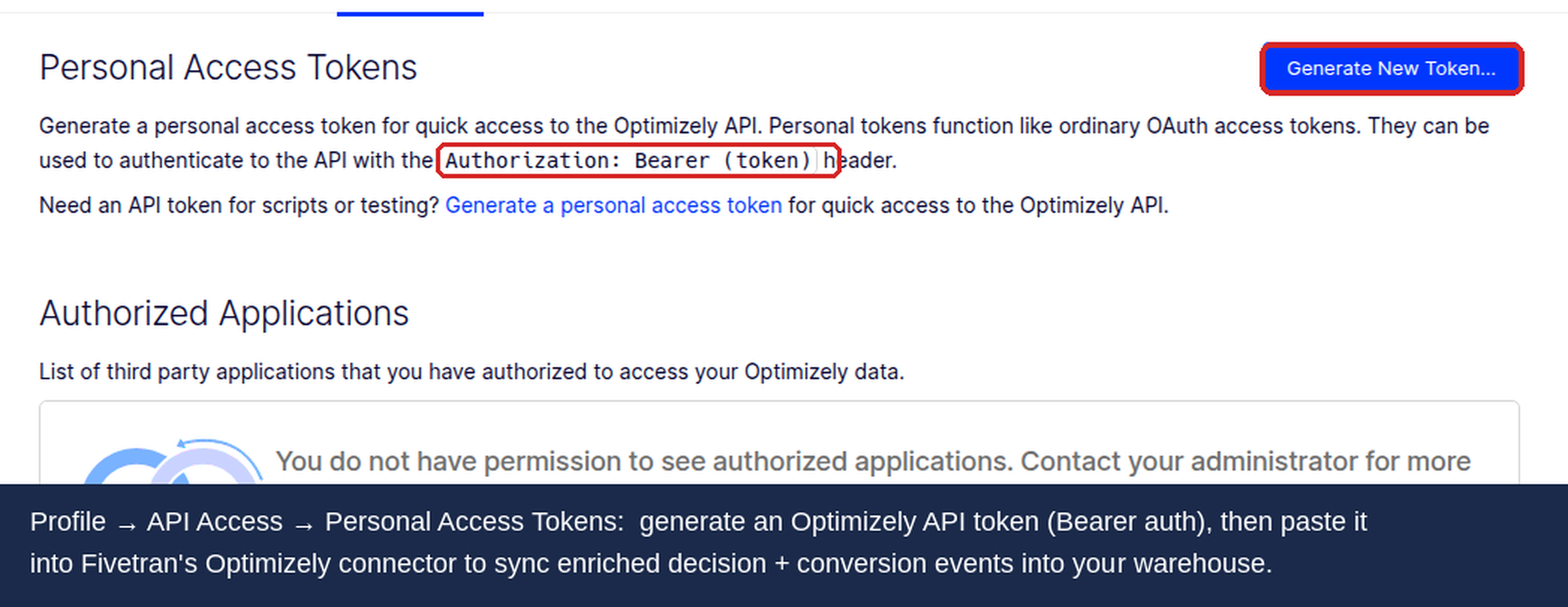
Log in to Optimizely at app.optimizely.com.
Go to Account Settings > API Access (under Registered Apps or API Tokens depending on your account type).
Click Generate New Token.
Copy the token — you will need it in the next step.
Step 2: Configure the Fivetran Connector
Log in to your Fivetran dashboard.
Click Add Connector and search for Optimizely.
Select your destination schema name (e.g.,
optimizely).Paste your Optimizely API token.
Enter your Optimizely Project ID — find it in the Optimizely URL bar when viewing your project (
https://app.optimizely.com/v2/projects/PROJECT_ID/...).Click Save & Test to verify the connection.
Step 3: Choose a Pack Mode
Fivetran offers two pack modes for the enriched export tables (CONVERSION and DECISION):
Mode | Behavior | Best For |
|---|---|---|
Packed (default) | Nested fields (attributes, experiments, tags) are stored as JSON columns in the parent table | Simpler schema, faster initial setup, flexible querying with JSON functions |
Unpacked | Nested fields are broken out into separate child tables (CONVERSION_ATTRIBUTE, DECISION_ATTRIBUTE, etc.) | Cleaner joins, better BI tool compatibility, easier dbt modeling |
Recommendation: Use unpacked mode if you plan to build dbt models or connect BI tools. Use packed mode if you prefer fewer tables and your warehouse supports efficient JSON querying (BigQuery and Snowflake both do).
Step 4: Configure Sync Frequency
In the connector settings, set your sync frequency. Options range from 1 hour to 24 hours.
For active experiments, a 6-hour sync is usually sufficient — experiment results do not change meaningfully minute to minute.
Click Start Initial Sync.
The initial sync pulls all historical data from your S3 buckets. Depending on your experiment volume, this can take minutes to hours. Subsequent syncs are incremental and much faster.
Step 5: Verify Data in Your Warehouse
After the initial sync completes:
Open your warehouse query editor.
Run a quick check:
-- Verify decision data loaded
SELECT COUNT(*) AS total_decisions,
       COUNT(DISTINCT experiment_id) AS experiments,
       MIN(timestamp) AS earliest,
       MAX(timestamp) AS latest
FROM optimizely.decision;
Confirm you see data from your active experiments and that the date range covers your expected history.
Querying Experiment Data
Once data is in your warehouse, you can run analyses that Optimizely's built-in reports do not support.
Conversion Rate by Variation
SELECT
  d.experiment_id,
  d.variation_id,
  COUNT(DISTINCT d.visitor_id) AS visitors,
  COUNT(DISTINCT c.visitor_id) AS converters,
  ROUND(COUNT(DISTINCT c.visitor_id)::DECIMAL / NULLIF(COUNT(DISTINCT d.visitor_id), 0) * 100, 2) AS conversion_rate_pct
FROM optimizely.decision d
LEFT JOIN optimizely.conversion_experiment ce
  ON d.experiment_id = ce.experiment_id
  AND d.visitor_id = ce.visitor_id
LEFT JOIN optimizely.conversion c
  ON ce.conversion_id = c.id
WHERE d.experiment_id = 'YOUR_EXPERIMENT_ID'
GROUP BY d.experiment_id, d.variation_id
ORDER BY d.variation_id;
Revenue per Variation
Join experiment decisions with conversion tags to analyze revenue impact:
SELECT
  d.variation_id,
  COUNT(DISTINCT d.visitor_id) AS visitors,
  SUM(ct.revenue) AS total_revenue,
  ROUND(SUM(ct.revenue)::DECIMAL / NULLIF(COUNT(DISTINCT d.visitor_id), 0), 2) AS revenue_per_visitor
FROM optimizely.decision d
LEFT JOIN optimizely.conversion_experiment ce
  ON d.experiment_id = ce.experiment_id
  AND d.visitor_id = ce.visitor_id
LEFT JOIN optimizely.conversion c
  ON ce.conversion_id = c.id
LEFT JOIN optimizely.conversion_tag ct
  ON c.id = ct.conversion_id
  AND ct.tag_name = 'revenue'
WHERE d.experiment_id = 'YOUR_EXPERIMENT_ID'
GROUP BY d.variation_id
ORDER BY d.variation_id;
Join with External Business Data
The real power of warehouse-based analysis is joining experiment data with data Optimizely cannot see. For example, joining with a CRM table to segment experiment results by customer tier:
SELECT
  d.variation_id,
  crm.customer_tier,
  COUNT(DISTINCT d.visitor_id) AS visitors,
  COUNT(DISTINCT c.visitor_id) AS converters,
  ROUND(COUNT(DISTINCT c.visitor_id)::DECIMAL / NULLIF(COUNT(DISTINCT d.visitor_id), 0) * 100, 2) AS conversion_rate_pct
FROM optimizely.decision d
JOIN your_schema.crm_customers crm
  ON d.visitor_id = crm.optimizely_visitor_id
LEFT JOIN optimizely.conversion_experiment ce
  ON d.experiment_id = ce.experiment_id
  AND d.visitor_id = ce.visitor_id
LEFT JOIN optimizely.conversion c
  ON ce.conversion_id = c.id
WHERE d.experiment_id = 'YOUR_EXPERIMENT_ID'
GROUP BY d.variation_id, crm.customer_tier
ORDER BY d.variation_id, crm.customer_tier;
This query answers questions like: "Does the new checkout flow perform better for Enterprise customers than for Free-tier users?" — something impossible to answer within Optimizely alone.
Sample Ratio Mismatch Detection
A sample ratio mismatch (SRM) occurs when the actual split of visitors between variations differs significantly from the expected split. SRM invalidates experiment results. Detect it with a simple query:
SELECT
  variation_id,
  COUNT(DISTINCT visitor_id) AS visitors,
  ROUND(COUNT(DISTINCT visitor_id)::DECIMAL /
    SUM(COUNT(DISTINCT visitor_id)) OVER () * 100, 2) AS pct_of_total
FROM optimizely.decision
WHERE experiment_id = 'YOUR_EXPERIMENT_ID'
GROUP BY variation_id
ORDER BY variation_id;
For a 50/50 split experiment, both variations should show close to 50%. A deviation beyond 1-2 percentage points warrants investigation — common causes include bot traffic, bucketing bugs, or sticky session issues.
Building dbt Models
If you use dbt for data transformation, create staging and mart models to make experiment data accessible to analysts and BI tools.
Staging Model
-- models/staging/stg_optimizely__decisions.sql
SELECT
  id AS decision_id,
  experiment_id,
  variation_id,
  visitor_id,
  timestamp AS decided_at,
  is_holdback
FROM {{ source('optimizely', 'decision') }}
WHERE experiment_id IS NOT NULL
Experiment Results Mart
-- models/marts/experiment_results.sql
WITH decisions AS (
  SELECT * FROM {{ ref('stg_optimizely__decisions') }}
),
conversions AS (
  SELECT
    ce.experiment_id,
    ce.visitor_id,
    c.timestamp AS converted_at,
    ct.revenue
  FROM {{ source('optimizely', 'conversion_experiment') }} ce
  JOIN {{ source('optimizely', 'conversion') }} c
    ON ce.conversion_id = c.id
  LEFT JOIN {{ source('optimizely', 'conversion_tag') }} ct
    ON c.id = ct.conversion_id
    AND ct.tag_name = 'revenue'
)
SELECT
  d.experiment_id,
  d.variation_id,
  COUNT(DISTINCT d.visitor_id) AS visitors,
  COUNT(DISTINCT conv.visitor_id) AS converters,
  ROUND(COUNT(DISTINCT conv.visitor_id)::DECIMAL /
    NULLIF(COUNT(DISTINCT d.visitor_id), 0) * 100, 2) AS conversion_rate_pct,
  SUM(conv.revenue) AS total_revenue,
  ROUND(SUM(conv.revenue)::DECIMAL /
    NULLIF(COUNT(DISTINCT d.visitor_id), 0), 2) AS revenue_per_visitor
FROM decisions d
LEFT JOIN conversions conv
  ON d.experiment_id = conv.experiment_id
  AND d.visitor_id = conv.visitor_id
GROUP BY d.experiment_id, d.variation_id
This mart gives every analyst in your organization a clean, pre-joined view of experiment results without needing to understand the raw Fivetran schema.
Gotchas
Experimentation Events Export Is an Add-On
The Fivetran connector reads from Optimizely's Experimentation Events Export feature, which is not included in all Optimizely plans. If you do not see event export settings in your Optimizely project, contact your account manager to enable it. Without this feature, Fivetran has no data source to read from.
EU Data Not Supported
Optimizely does not currently support the Fivetran integration for data hosted on Optimizely's EU servers. If your Optimizely project is in the EU data center, the connector will not work. Check with Optimizely support for regional availability updates.
Initial Sync Can Be Large
If you have years of experiment history, the initial sync pulls all of it. This can result in large data transfers and warehouse storage costs. Review your S3 bucket size before starting the initial sync, and consider whether you need the full history or can configure a start date.
Fivetran Schema Naming
Fivetran creates tables with uppercase names by default (DECISION, CONVERSION, etc.). Some warehouses and BI tools are case-sensitive. If your downstream tooling expects lowercase, configure a transformation in Fivetran or dbt to normalize table names.
Statistical Significance Not Included
The raw event data in your warehouse contains decisions and conversions, not p-values or confidence intervals. Optimizely's stats engine applies sequential testing with false discovery rate correction — replicating this in SQL is complex. Use the Optimizely results page for statistical decisions and the warehouse for business context analysis.
Sync Frequency vs. Experiment Duration
Do not over-sync. A 1-hour sync for a 30-day experiment creates unnecessary load and cost. Match sync frequency to how often you check results — for most experiments, a 6-hour or daily sync is sufficient. Reserve hourly syncs for time-sensitive experiments or real-time monitoring needs.
Troubleshooting
Connector Shows "No Data"
Verify that Experimentation Events Export is enabled in your Optimizely project settings.
Confirm your API token has read access to the project.
Check that the Project ID matches the project where your experiments run.
Verify that at least one experiment has been running long enough to generate event data (events export may have a 24-48 hour delay for new projects).
Missing Experiments in Data
Not all experiments generate events export data. Verify that:
The experiment is not in draft status — only running or paused experiments with collected data appear.
The experiment has been running long enough for events to be exported to S3.
The connector schema includes the table where the data should appear (check Fivetran schema tab).
Conversion Counts Do Not Match Optimizely UI
Expect small differences between raw event counts and the Optimizely results page. Causes:
Deduplication: Optimizely's results page deduplicates conversions per unique visitor per experiment. Raw conversion events may include multiple conversions per visitor.
Attribution window: Optimizely applies an attribution window to conversions. The raw data includes all conversions regardless of timing.
Bot filtering: Optimizely's results page filters known bot traffic. Raw events may include bot-generated events.
For accurate comparison, deduplicate conversions by visitor and experiment in your SQL queries, and apply the same attribution logic Optimizely uses.
High Warehouse Costs
If costs are unexpectedly high after enabling the connector:
Switch to packed mode to reduce table count and row volume.
Reduce sync frequency (sync less often) to lower the number of syncs per day.
Partition tables by date in your warehouse to improve query performance and reduce scan costs.
Archive old experiment data to cold storage after analysis is complete.
Related guides
Independent experimentation specialist
David Sertillange is an independent experimentation specialist with 10 years implementing Optimizely across enterprise programs. He specializes in Feature Experimentation, analytics integrations, and helping teams build a culture of data-driven decision making.
Related articles
Subscribe
Practical Optimizely tips, monthly. No fluff.