
Integrate Mixpanel with Optimizely Feature Experimentation
 David SertillangeIndependent experimentation specialist
TL;DR
Optimizely Feature Experimentation uses SDK-based feature flags evaluated server-side or in native apps, rather than a client-side snippet. Integrating with Mixpanel sends experiment decision data into your analytics platform as both tracked events and persistent user profile properties, enabling behavioral segmentation by experiment variation, funnel analysis across treatment groups, and cohort-based experiment targeting through Optimizely Data Platform (ODP).
This guide covers JavaScript/Node.js and Python implementations using the SDK's Decision Notification Listener, explains the differences between browser and server-side Mixpanel SDKs, and walks through building segments and funnels filtered by experiment in the Mixpanel dashboard.
How the Integration Works
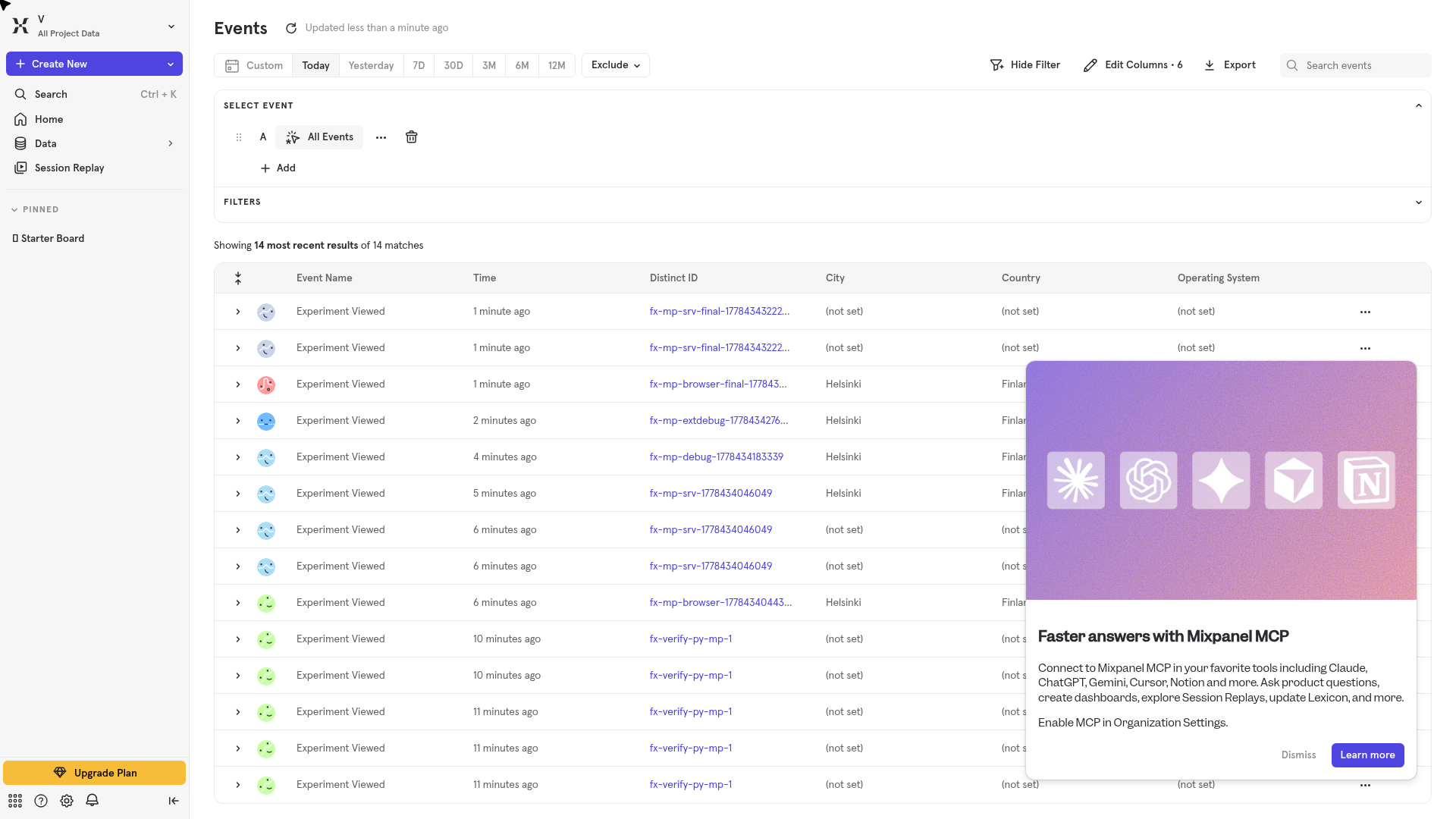
When the Optimizely Feature Experimentation SDK evaluates a feature flag using the decide() method, it fires a DECISION notification. You register a listener for this notification that captures the flag key, variation key, and experiment details, then sends the data to Mixpanel as both a user profile property (via people.set()) and an event (via track()). Mixpanel then associates the experiment context with all subsequent events from that user.
sequenceDiagram
    participant App as Application
    participant SDK as Optimizely SDK
    participant Listener as DECISION Listener
    participant MP as Mixpanel SDK
    participant Dash as Mixpanel Dashboard

    App->>SDK: createInstance(sdkKey)
    App->>SDK: addNotificationListener(DECISION, callback)
    App->>SDK: user.decide("flag_key")
    SDK->>Listener: DECISION notification fires
    Listener->>MP: people.set() — set profile property
    Listener->>MP: track("Experiment Viewed", {...})
    MP->>Dash: Profile property + event visible in dashboard
    Dash->>Dash: Build segments, funnels, retention by variation
Decision Notification Data
The DECISION notification provides the following data through the callback arguments:
Field | Location | Type | Description |
|---|---|---|---|
| Top level | string | Decision type — filter for |
| Top level | string | The user ID passed to the SDK |
| Top level | object | User attributes passed to the SDK |
|
| string | The feature flag key (e.g., |
|
| boolean | Whether the flag is enabled for this user |
|
| string | The assigned variation (e.g., |
|
| string | The rule that matched (experiment or rollout key) |
|
| boolean | Whether Optimizely sent an event to its own analytics |
The decisionEventDispatched field indicates whether Optimizely dispatched a decision event to its own analytics backend. When false, Optimizely skipped its own event (because the decision matched a targeted delivery/rollout rather than an experiment, or the DISABLE_DECISION_EVENT option was used). Your Mixpanel integration should still send the data regardless, because Mixpanel needs the experiment context associated with every relevant session.
User Profile Property Format
The user profile property follows a consistent naming convention:
[Optimizely] flagKey = variationKey
For example, a user bucketed into the variation_a treatment of a checkout_redesign flag would have a profile property:
[Optimizely] checkout_redesign = variation_a
This format groups all Optimizely experiments under the [Optimizely] namespace, making them easy to locate in Mixpanel's People profile view.
Prerequisites
Before starting the integration:
Optimizely Feature Experimentation SDK installed for your platform (JavaScript SDK v6+, Node.js SDK, or Python SDK).
Mixpanel SDK installed and initialized for the same platform:
Node.js:
npm install mixpanelPython:
pip install mixpanelBrowser:
npm install mixpanel-browser
A feature flag with an experiment rule configured in your Optimizely project.
Consistent user ID between the Optimizely SDK and Mixpanel. Both must use the same
distinct_idfor the experiment context to be associated with the correct Mixpanel user profile.
JavaScript / Node.js Implementation
The Mixpanel JavaScript and Node.js SDKs have different APIs. The browser SDK (mixpanel-browser) supports super properties via mixpanel.register(), which automatically attach to all subsequent events. The server-side mixpanel Node.js package does not have this concept — every track() call must include the experiment context explicitly, or you rely on profile properties set via people.set().
Browser Setup
Using mixpanel-browser in a browser environment:
import mixpanel from 'mixpanel-browser';
import { createInstance, enums } from '@optimizely/optimizely-sdk';

// Initialize Mixpanel
mixpanel.init('YOUR_MIXPANEL_TOKEN');

// Initialize Optimizely
const optimizely = createInstance({
  sdkKey: '<YOUR_SDK_KEY>',
});

optimizely.onReady().then(() => {
  // Register the DECISION notification listener BEFORE any decide() calls
  optimizely.notificationCenter.addNotificationListener(
    enums.NOTIFICATION_TYPES.DECISION,
    ({ type, userId, attributes, decisionInfo }) => {
      // Only process flag decisions
      if (type !== 'flag') return;

      const { flagKey, enabled, variationKey, ruleKey } = decisionInfo;
      const propertyName = `[Optimizely] ${flagKey}`;
      const propertyValue = enabled ? variationKey : 'off';

      // Set a super property so the experiment context attaches to all future events
      mixpanel.register({ [propertyName]: propertyValue });

      // Set a persistent user profile property
      mixpanel.people.set({ [propertyName]: propertyValue });

      // Track the exposure event
      mixpanel.track('Experiment Viewed', {
        flag_key: flagKey,
        variation_key: variationKey,
        rule_key: ruleKey,
        enabled: enabled,
      });
    }
  );

  // Now make decisions — the listener fires for each one
  const user = optimizely.createUserContext(userId, userAttributes);
  const decision = user.decide('checkout_redesign');
  console.log('Variation:', decision.variationKey);
});
The mixpanel.register() call sets a super property — a key/value pair that Mixpanel automatically appends to every subsequent track() call in the same session. This means your conversion events (purchases, sign-ups, clicks) will carry the experiment context without any additional code changes.
Node.js Setup
The server-side mixpanel npm package requires distinct_id to be passed explicitly in every track() and people.set() call. There is no register() or session concept server-side.
const Mixpanel = require('mixpanel');
const optimizelySdk = require('@optimizely/optimizely-sdk');

// Initialize Mixpanel — server-side
const mp = Mixpanel.init('YOUR_MIXPANEL_TOKEN');

// Initialize Optimizely
const optimizely = optimizelySdk.createInstance({
  sdkKey: '<YOUR_SDK_KEY>',
});

optimizely.onReady().then(() => {
  // Register the DECISION notification listener
  optimizely.notificationCenter.addNotificationListener(
    optimizelySdk.enums.NOTIFICATION_TYPES.DECISION,
    ({ type, userId, attributes, decisionInfo }) => {
      if (type !== 'flag') return;

      const { flagKey, enabled, variationKey, ruleKey } = decisionInfo;
      const propertyName = `[Optimizely] ${flagKey}`;
      const propertyValue = enabled ? variationKey : 'off';

      // Set persistent profile property — must pass distinct_id explicitly
      mp.people.set(userId, {
        [propertyName]: propertyValue,
      });

      // Track the exposure event — distinct_id goes in the properties object
      mp.track('Experiment Viewed', {
        distinct_id: userId,
        flag_key: flagKey,
        variation_key: variationKey,
        rule_key: ruleKey,
        enabled: enabled,
      });
    }
  );
});

// In your request handler
function handleRequest(userId, userAttributes) {
  const user = optimizely.createUserContext(userId, userAttributes);
  const decision = user.decide('checkout_redesign');
  // The DECISION listener fires and sends data to Mixpanel
  return decision;
}
The Node.js Mixpanel SDK sends HTTP requests to Mixpanel's ingestion API in a fire-and-forget manner. There is no explicit flush step required, but connection errors are silent by default. If you need error visibility, pass a callback as the last argument to track():
mp.track('Experiment Viewed', { distinct_id: userId, flag_key: flagKey }, (err) => {
  if (err) console.error('Mixpanel track error:', err);
});
Listener Registration Timing
The notification listener must be registered before any decide() calls. If you register the listener after decide() runs, those decisions are lost — the Optimizely SDK does not replay past notifications to newly registered listeners.
// CORRECT: Register listener before decide()
optimizely.onReady().then(() => {
  optimizely.notificationCenter.addNotificationListener(
    enums.NOTIFICATION_TYPES.DECISION,
    callback
  );
  const decision = user.decide('flag_key'); // Listener fires
});

// WRONG: Registering after decide() misses the decision
optimizely.onReady().then(() => {
  const decision = user.decide('flag_key'); // Listener not registered yet
  optimizely.notificationCenter.addNotificationListener(
    enums.NOTIFICATION_TYPES.DECISION,
    callback // Too late — the decision above was not captured
  );
});
Python Implementation
The Python SDK uses the same notification listener pattern. Use the mixpanel Python package to send data to Mixpanel.
from mixpanel import Mixpanel
from optimizely import optimizely
from optimizely.helpers import enums

# Initialize Mixpanel
mp = Mixpanel('YOUR_MIXPANEL_TOKEN')

# Initialize Optimizely
optimizely_client = optimizely.Optimizely(sdk_key='YOUR_SDK_KEY')


# The Python SDK calls DECISION listeners with four positional args
# (decision_type, user_id, attributes, decision_info) — encoded in
# enums.NotificationTypes.DECISION as
# "DECISION:type, user_id, attributes, decision_info". A single-arg
# (notification_type, args) signature receives the wrong values and
# silently returns when args.get('decisionInfo') is None.
def on_decision(decision_type, user_id, attributes, decision_info):
    # Only process flag decisions
    if decision_type != 'flag':
        return

    # decision_info keys are snake_case in the Python SDK
    flag_key = decision_info.get('flag_key', '')
    enabled = decision_info.get('enabled', False)
    variation_key = decision_info.get('variation_key', '')
    rule_key = decision_info.get('rule_key', '')

    property_name = f'[Optimizely] {flag_key}'
    property_value = variation_key if enabled else 'off'

    # Set persistent user profile property
    # Python: mp.people_set(distinct_id, properties)
    mp.people_set(user_id, {
        property_name: property_value,
    })

    # Track the exposure event
    # Python: mp.track(distinct_id, event_name, properties)
    mp.track(user_id, 'Experiment Viewed', {
        'flag_key': flag_key,
        'variation_key': variation_key,
        'rule_key': rule_key,
        'enabled': enabled,
    })

# Register the listener BEFORE any decide() calls
notification_id = optimizely_client.notification_center.add_notification_listener(
    enums.NotificationTypes.DECISION,
    on_decision,
)

# Make a decision — the listener fires
user = optimizely_client.create_user_context('user_123', {'plan': 'premium'})
decision = user.decide('checkout_redesign')
print(f'Variation: {decision.variation_key}')
The Python Mixpanel SDK sends events synchronously by default — each track() and people_set() call makes an HTTP request immediately. For high-throughput server environments, use BufferedConsumer to batch events before sending:
from mixpanel import Mixpanel, BufferedConsumer

# BufferedConsumer batches up to 50 events per HTTP request
buffer = BufferedConsumer()
mp = Mixpanel('YOUR_MIXPANEL_TOKEN', consumer=buffer)

# After processing a batch of decisions, flush the buffer
buffer.flush()
For AWS Lambda or similar short-lived environments, call buffer.flush() at the end of the handler to ensure all events are sent before the function terminates.
Building Segments and Funnels in Mixpanel
Creating a Cohort by Experiment Variation
Go to Data Management > Cohorts > New Cohort in Mixpanel.
Add a condition: Profile Property
[Optimizely] checkout_redesignequalsvariation_a.Save the cohort (e.g., "Checkout Redesign — Variation A").
Repeat for the control group: profile property
[Optimizely] checkout_redesignequalscontrol.
These cohorts update dynamically as new users are bucketed into the experiment.
Funnel Analysis by Variation
To compare funnel performance between variations:
Go to Funnels > New Funnel.
Define your funnel steps (e.g., Experiment Viewed → Add to Cart → Checkout Started → Purchase Completed).
In Breakdown, select the event property
variation_key(from the "Experiment Viewed" event) or the profile property[Optimizely] checkout_redesign.Mixpanel displays conversion rates for each variation side by side.
Insights Reports Filtered by Experiment
In Insights, filter any metric by experiment variation:
Select your target metric event (e.g., "Purchase Completed").
Add a filter: event property
flag_keyequalscheckout_redesign.Apply a breakdown: event property
variation_key.Mixpanel renders a line or bar chart comparing metric trends per variation.
Mixpanel Chart Types and Use Cases
Chart Type | Use Case |
|---|---|
Insights | Compare event counts or rates (purchases, clicks) by variation |
Funnels | Compare multi-step conversion rates between control and treatment |
Flows | Compare navigation paths and drop-off points between variations |
Retention | Measure long-term engagement and return rates by variation |
Users | Browse individual user profiles to inspect experiment assignments |
Retention Analysis
To measure whether a variation affects long-term retention:
Go to Retention > New Retention.
Set the starting event to "Experiment Viewed" filtered by
flag_key = checkout_redesign.Set the return event to your engagement metric (e.g., "Session Started" or "Feature Used").
Apply a breakdown by
variation_key.Compare Day 1, Day 7, and Day 30 retention rates across variations.
Mixpanel Cohort Sync via ODP
Optimizely Data Platform (ODP) supports a reverse direction integration: you define behavioral cohorts in Mixpanel and sync them to Optimizely for experiment targeting. This enables you to run experiments on precise behavioral segments identified through Mixpanel analysis — for example, targeting users who completed onboarding in the last 30 days, or users who triggered a specific error event.
How Cohort Sync Works
sequenceDiagram
    participant MP as Mixpanel
    participant Webhook as Mixpanel Webhook
    participant ODP as Optimizely Data Platform
    participant SDK as Optimizely FX SDK
    participant App as Application

    MP->>MP: Define behavioral cohort
    MP->>Webhook: Export cohort via Custom Webhook
    Webhook->>ODP: POST user list to ODP endpoint
    ODP->>ODP: Create audience from cohort membership
    App->>SDK: createUserContext(userId, attributes)
    SDK->>ODP: Evaluate audience membership
    ODP->>SDK: User is in cohort audience
    SDK->>App: Return decision targeting cohort members
Setup Steps
In the Optimizely Data Platform App Directory, find and install the Mixpanel integration. Copy the generated webhook endpoint URL.
In Mixpanel, go to Data Management > Integrations > Custom Webhooks > New Webhook.
Paste the ODP webhook URL into the endpoint field.
Go to the Mixpanel cohort you want to sync, open Export, and select the Custom Webhook you just created.
Configure a sync schedule (hourly or daily depending on your use case).
In Optimizely Feature Experimentation, the synced audience appears in the Audiences list prefixed with
mixpanel_(e.g.,mixpanel_power_users).Assign this audience to an experiment rule in your feature flag to restrict bucketing to cohort members.
Use Cases for Cohort Sync
Mixpanel Cohort | Optimizely Experiment |
|---|---|
Users with 10+ sessions in 30 days | Test advanced features gated for power users |
Users who triggered an error event | Test improved error handling or recovery flows |
Users who reached the pricing page without converting | Test upgrade prompt or pricing presentation variants |
Users from a specific acquisition campaign | Test onboarding variants by acquisition channel |
Users who completed onboarding in the last 7 days | Test activation nudge variants for new users |
Gotchas
Listener Registration Timing
The most common integration failure is registering the notification listener after decide() calls have already executed. The Optimizely SDK fires the DECISION notification synchronously during decide() — if no listener is registered at that moment, the notification is discarded. Always register the listener immediately after onReady() resolves and before any decide() calls.
User ID Consistency
The Optimizely SDK and Mixpanel must use the same user identifier. In Mixpanel, this is the distinct_id. In Optimizely, this is the user ID passed to createUserContext(). If these values differ, the experiment property lands on a different Mixpanel profile than the user's behavioral events.
For browser implementations, use the same identifier for both:
const userId = getCurrentUserId(); // Your auth system or anonymous ID

// Set Mixpanel identity
mixpanel.identify(userId);

// Use the same ID for Optimizely
const user = optimizely.createUserContext(userId, attributes);
For anonymous users, you can read Mixpanel's auto-generated device ID and pass it to Optimizely:
// Browser: use Mixpanel's distinct_id as the Optimizely user ID
const mixpanelId = mixpanel.get_distinct_id();
const user = optimizely.createUserContext(mixpanelId, attributes);
Multiple Decide Calls Firing Repeated Events
The DECISION notification fires for every decide() call, even when the user has already been bucketed into the same variation. In React applications that call decide() on every render cycle, the listener can fire dozens of times per session. While Mixpanel deduplicates profile property writes (setting the same property to the same value has no effect on the profile), each track() call creates a new event record. High event volume inflates "Experiment Viewed" counts and can affect funnel analysis.
Add a session-level deduplication guard to the listener:
const processedDecisions = new Set();

optimizely.notificationCenter.addNotificationListener(
  enums.NOTIFICATION_TYPES.DECISION,
  ({ type, userId, decisionInfo }) => {
    if (type !== 'flag') return;

    const key = `${userId}:${decisionInfo.flagKey}:${decisionInfo.variationKey}`;
    if (processedDecisions.has(key)) return;
    processedDecisions.add(key);

    // Send to Mixpanel only once per unique decision in this session
    mixpanel.people.set({ [`[Optimizely] ${decisionInfo.flagKey}`]: decisionInfo.variationKey });
    mixpanel.track('Experiment Viewed', {
      flag_key: decisionInfo.flagKey,
      variation_key: decisionInfo.variationKey,
    });
  }
);
No Super Properties in Server-Side SDKs
The mixpanel.register() super properties API is a browser-only concept. The Node.js mixpanel package and Python mixpanel package do not have this method. On the server, there is no persistent session to attach super properties to.
The practical consequence: conversion events tracked server-side (purchases, API calls) will not automatically carry the experiment context. You have two options:
Include experiment context in every server-side track call — pass
flag_keyandvariation_keyas properties in the event that matters (requires knowing the active experiments at tracking time).Rely on profile properties —
people.set()sets the property on the user's profile, and Mixpanel's cohort and user-level analysis will use it. Event-level analysis filtered by variation requires the property to be in the event itself.
Node.js SDK: Silent Connection Errors
The Node.js mixpanel package sends events fire-and-forget. If Mixpanel's API is unreachable or returns an error, the default behavior is to silently discard the event. For production integrations, attach error callbacks:
mp.track('Experiment Viewed', { distinct_id: userId, flag_key: flagKey }, (err) => {
  if (err) console.error('Failed to track Mixpanel event:', err);
});

mp.people.set(userId, { [`[Optimizely] ${flagKey}`]: variationKey }, (err) => {
  if (err) console.error('Failed to set Mixpanel profile property:', err);
});
Python SDK: Synchronous by Default
The Python mixpanel package makes a blocking HTTP request for every track() and people_set() call. In web request handlers, this adds latency to every request that triggers a flag decision. For production use, use BufferedConsumer to batch events, or offload Mixpanel calls to a background thread or task queue.
Troubleshooting
Profile Properties Not Appearing in Mixpanel
If "Experiment Viewed" events appear in the event stream but user profile properties do not show up:
Check
distinct_idconsistency: Thepeople.set()call must use the samedistinct_idthat identifies the user's profile. Iftrack()andpeople.set()use different IDs, the property lands on a different profile than the events.Check Mixpanel plan: User profile properties (People Analytics) require a Mixpanel plan that includes People features. Verify your account supports People profiles.
Browser: call
mixpanel.identify(): In browser integrations,people.set()only works if the user has been identified viamixpanel.identify(userId). Without this call, profile updates are silently discarded for anonymous users (depending on SDK version and configuration).Processing delay: Mixpanel profile properties can take 1-2 minutes to appear in the dashboard after ingestion.
Events Not Appearing in Mixpanel
If neither events nor properties appear in the Mixpanel dashboard:
Listener not registered: Add a
console.loginside your callback to confirm it fires. If it does not, the listener was registered too late (afterdecide()) or the SDK is not fully initialized.SDK not ready: Ensure
decide()is called afteronReady()resolves. Callingdecide()before the SDK downloads its datafile may return a default decision without firing the DECISION notification in all SDK versions.Token mismatch: Verify you are using the correct Mixpanel project token. Events sent to the wrong project do not appear where you are looking.
Network errors: In Node.js, check for errors using the callback parameter on
track(). In Python, wrap Mixpanel calls in try/except to surface HTTP errors.
Decision Listener Fires But Data Is Wrong
If the listener fires but the data sent to Mixpanel is incorrect:
Check
decisionInfoshape: Log the fulldecisionInfoobject. For simple rollouts (no experiment rule),ruleKeymay be empty andvariationKeymay reflect the rollout variation rather than an experiment variation.enabled: falsehandling: When a flag is disabled for a user or the user is in the default variation,variationKeymay be an empty string or"off". The example code sends"off"as the property value whenenabledis false — verify this matches your intended fallback behavior.variationKeyis empty string: If no rule matched (the user fell through to the default),variationKeywill be an empty string andruleKeywill be empty. These users are not part of any experiment — consider filtering them out withif (!ruleKey) return;.
Data Discrepancies Between Optimizely and Mixpanel
Differences in user counts between platforms are expected and normal:
Counting methodology: Optimizely counts unique visitors per experiment per environment. Mixpanel counts unique users who triggered "Experiment Viewed". Identity resolution differences — particularly around anonymous-to-identified user merges — cause divergence.
Python batching drops: If using
BufferedConsumerand the process terminates beforebuffer.flush()is called, buffered events are lost. Ensure flush is called in shutdown handlers.Multiple decisions: If
decide()is called multiple times without deduplication, Optimizely records one unique visitor but Mixpanel receives multiple events. Implement theSet-based deduplication guard above to align counts.Ad blockers: Browser Mixpanel requests are commonly blocked by ad blockers and privacy extensions. Server-side tracking avoids this entirely and produces more accurate counts.
Expect 5-15% divergence between platforms for browser-based integrations. Divergence above 20% warrants investigation into ID consistency and listener registration timing.
Related guides
Independent experimentation specialist
David Sertillange is an independent experimentation specialist with 10 years implementing Optimizely across enterprise programs. He specializes in Feature Experimentation, analytics integrations, and helping teams build a culture of data-driven decision making.
Also available for
Related articles
Subscribe
Practical Optimizely tips, monthly. No fluff.